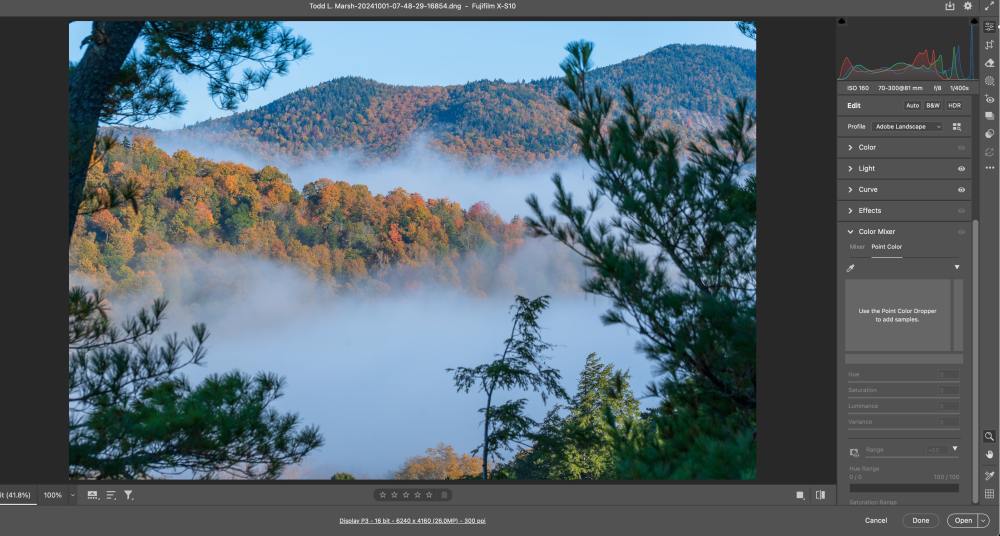


One of my pet peeves is when someone says, “Here is the RAW image straight out of the camera.” You hear this all the time in YouTube videos. This is never true. RAW data cannot be seen directly. It must be interpreted first.
What they should actually be saying is “Here is my image without any of MY edits.”
So while it’s true the photographer hasn’t made any edits, the software already has.
What a RAW File Really Is
A RAW file is essentially a collection of measurement data from your camera’s sensor.
It records the amount of light that strikes each pixel, but each pixel captures only one color, either red, green, or blue, depending on the filter applied.
Most cameras use a Bayer filter pattern, which places twice as many green pixels as red or blue ones because our eyes are more sensitive to green light. No single pixel contains complete color information.
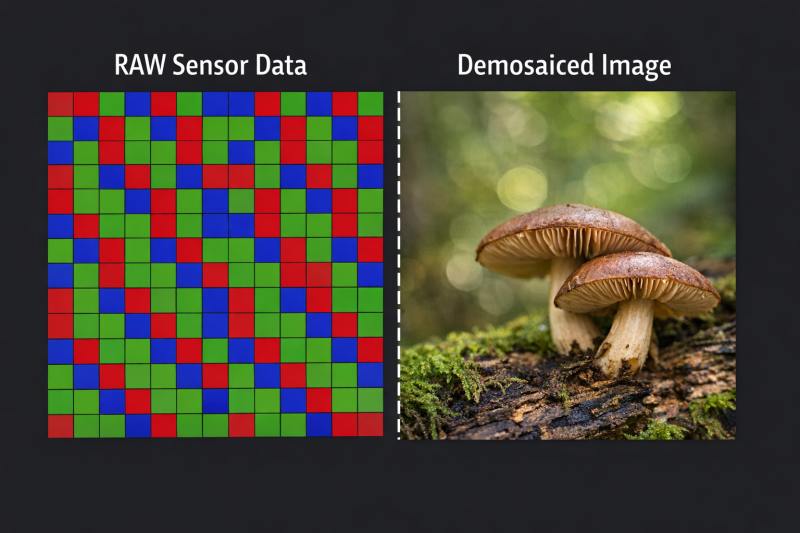
The data is linear, meaning brighter areas contain far more information than darker areas, and there is no contrast curve, no finished color, and no applied sharpness.
By itself, RAW data is not an image—it is simply a structured grid of numerical values representing light intensity and identified by one of the three colors, green, blue, or red.
Why Can Raw Data Not Be Displayed
In order to display an image on a screen, each pixel must have complete red, green, and blue values. The combination of these three values is the hue, and adding the luminance value (or brightness), you get the color of that pixel.
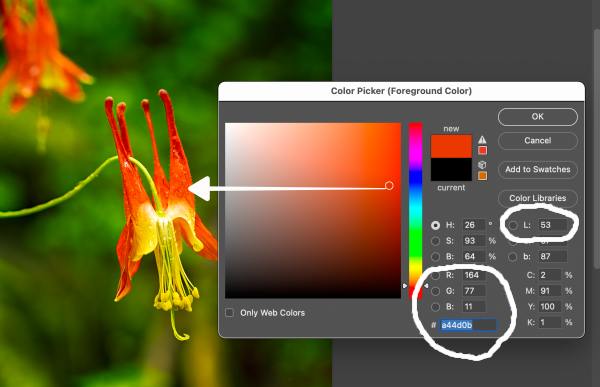
At the pixel level, RAW data provides the luminance value and only one of the three colors, leaving the other two missing. Without processing (demosaicing), this data would appear as a mosaic (grid), with broken and incomplete colors and edges that would not hold together.
To turn RAW data into a visible image, the missing color information must be reconstructed in a process called demosaicing.
If you’re not sure what demosaicing is, don’t feel bad, as I didn’t either, and I, along with ChatGPT and the internet, dove into that rabbit hole here: What is Demosaicing and How Cameras Interpret Light Differently From the Human Eye.
What You See on the Back of the Camera
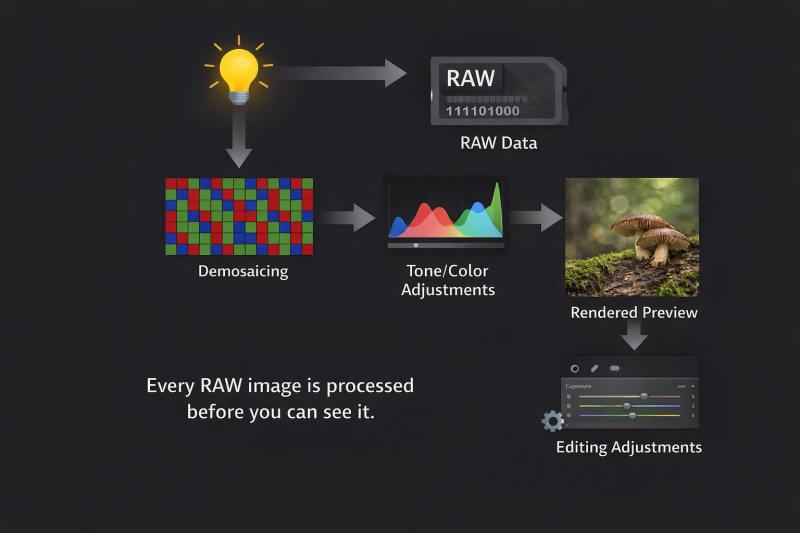
When you review an image on the back of your camera, what you are actually seeing is a JPEG preview, not the RAW file itself.
The camera quickly creates this JPEG by demosaicing the RAW data and applying settings such as white balance, contrast, color styles, and sharpening. The chosen camera profile, i.e., landscape, neutral, vivid, or another camera manufacturer’s profile, affects the look of this preview.
Importantly, the underlying RAW data does not change; only the preview changes. Even the histogram you see on the camera is based on this processed JPEG, not on the raw sensor measurements.
What You See When You Import to a Computer
RAW files often contain an embedded preview created by the camera or your imported profile settings, which is displayed immediately by the software when the file is opened. This is why images appear instantly.
Shortly after, the software ignores this embedded preview and reads the actual RAW sensor data, applying its own demosaicing algorithm and color profiles to produce a fresh image. The appearance of the image may update, and the final look depends entirely on the software and its processing choices.
Here is an article I have written that explains how Lightroom and the Adobe Camera Raw engine work with image data.
Each Photo Editing Software Demosaics Differently
Each RAW processing program uses its own pipeline to interpret the same sensor data.
Different programs employ different demosaicing methods, tone curves, and color response adjustments. Adobe Camera Raw and Lightroom tend to favor tonal balance and neutral colors, Capture One emphasizes fine detail and sharpness, DxO prioritizes noise reduction and technical accuracy, and Luminar leans toward aesthetic style.
Although all start with the same RAW data, they produce distinctly different images, and none of them display the unprocessed RAW file.
More on this in the next published article (subscribe if you want to be notified).
Get an email when new articles are published
What You Are Actually Editing
When you make adjustments in software, you are editing a rendered interpretation of the RAW data, not the RAW data itself.
Every adjustment you make forces the software to reprocess the RAW file, reapply demosaicing, and incorporate your settings to generate a new image. This process occurs continuously as you move sliders for exposure, color, or sharpening.
Why This Matters for Photographers
Understanding that you are always working with an interpretation of RAW data rather than the RAW file itself sets realistic expectations.
There is no hidden, perfect image to uncover—there is only the way the software interprets your sensor data. This explains why different programs feel different and why one might feel more natural or appealing than another. Essentially, you are choosing how to translate the scene as you remember it, not uncovering some objective truth.
The Meaning of Non-Destructive Editing
Non-destructive editing means that the original RAW measurements remain untouched regardless of the changes you make. It does not imply that you are viewing RAW data in real time. The image you see is temporary and exists only as long as the software applies the processing instructions you set.
The One Sentence Truth
You never see a RAW image directly. Instead, you see a processed interpretation that the camera or editing software generates from RAW sensor data.
How This Connects to Demosaicing and the Next Article in this Series
Demosaicing is the very first step in interpreting RAW data. Every subsequent adjustment—sharpening, color grading, noise reduction—depends on how the demosaicing was performed. This explains why different RAW processors yield different results, even when starting from the same file.
The Bottom Line
Please don’t say, “Here is the RAW file.” You can’t see the image in RAW format.
What you can say is here is the image before I made any edits, and state what camera or editing profile you are using.
What Editing Software Is More Realistic?
That question will be addressed in the next article.
Once you read that article, you can focus on choosing the software and settings that produce an image closest to your memory and vision of the scene, as that choice will ultimately define your work.