


Photographers who dive deep into RAW image editing know that getting the best results starts with choosing the right camera profile.
One name that’s gained serious traction in the photography editing world is Tony Kuyper, whose Linear Profiles for Adobe Lightroom and Adobe Camera Raw (ACR) offer a powerful alternative to the default options.
But what exactly is a linear profile—and why should photographers consider using one?
In this post, we’ll explore what Tony Kuypers linear profiles are, why they matter, the advantages and disadvantages of using them, and which types of photography benefit most from this approach.
We’ll also touch on other sources of linear profiles for those who want more options for their post-processing workflow.
What Is a Linear Profile?
At its core, a linear profile is a custom camera profile designed to give photographers a flat, neutral starting point when editing RAW files. Unlike Adobe’s default profiles—like Adobe Color or Adobe Landscape—that include built-in tone curves to add contrast and vibrancy, a linear profile does not apply any tone curve.
This means:
- No automatic boost in contrast, saturation, or brightness
- The profile preserves more of the raw sensor data
- The result is a flatter image, but one that retains significantly more editable dynamic range
Think of it as a blank canvas, allowing photographers to take full control of how their image evolves during the editing process.
If you want to know more about Adobe profiles and how they work I have written an article explaining them in more detail. Click here to read the article.
How Tony Kuypers Linear Profiles Work
Tony Kuyper, known for his luminosity masking tools and advanced tonal editing workflows, developed a set of Linear Profiles tailored for Adobe Lightroom and ACR. These profiles are installed like any other custom profile and can be found in the Basic Panel in the Profile dropdown.
When you select a Tony Kuyper Linear Profile, it replaces the default Adobe profile for your RAW image, eliminating the baked-in tone curve and saturation adjustments.
This leaves you with a “clean slate” from which to perform more precise and controlled edits.
New Linear Profile Discussion
I have written another Linear Profile article that is more technical. You can read it by clicking the following link: Why Linear Profiles Give You More Control.
Linear Profiles are Camera-Specific – Here is Why
When working with RAW files, Lightroom and ACR use a camera profile to interpret how the sensor data should be rendered as an image.
Each camera model has a unique sensor with its own color science, response curves, and dynamic range characteristics.
A linear profile for one camera (e.g., a Canon EOS R5) will not be accurate—or even compatible—for a different camera (e.g., a Sony A7 IV).
What This Means in Practice
- Tony Kuypers Linear Profiles are created for specific camera models. When you purchase them, you usually get a profile set tailored to your camera’s sensor.
- When you install a linear profile in Lightroom or ACR, it will only be available for use with RAW files from the camera model it was made for.
- If you shoot with multiple camera bodies, you’ll need linear profiles for each one.
Advantages of Using Linear Profiles
Using Tony Kuypers Linear Profiles can unlock a whole new level of editing potential. Here’s why many landscape and macro photographers swear by them:
1. Maximum Editing Flexibility
Since no contrast is added at the profile level, shadows and highlights remain uncompressed, giving editors a broader tonal range to work with.
This is especially helpful when adjusting exposure without fear of losing detail in the extremes.
2. Superior Shadow and Highlight Recovery
Linear profiles allow for more precise recovery of details in bright skies, reflective surfaces, and dark shadows. Whether you’re shooting golden hour landscapes or mushroom patches in shadowy forest floors, this control can be the difference between a good edit and a great one.
3. More Accurate Local Adjustments
When used in tandem with tools like luminosity masks—a cornerstone of Kuyper’s editing method—linear profiles help ensure that local adjustments don’t conflict with the global tone curve of the image. This results in more consistent and accurate enhancements.
4. Improved Color Grading Control
Without the saturation or hue shifts that come from contrast-heavy profiles, color is closer to the true raw data. This neutral foundation means your color grading isn’t fighting against a baked-in style, making creative or naturalistic color correction much easier.
5. Consistency Across Image Batches
If you’re editing a series of photos (e.g., from a landscape shoot or mushroom photography workshop), linear profiles provide a consistent, uniform base.
This is crucial for achieving a professional, cohesive look—especially when images will be displayed side-by-side or as part of a portfolio.
Comparing Adobe Color Profile to Tony Kuypers Linear Profile Example
Below is an example of a waterfall image. The image was taken using a FujiFilm X-S10 camera. The left side is using Adobe Color Profile, and the right side is Tony Kuypers Linear Profile for the X-S10. You can use the split-screen slider to compare the whole image.
Read below before reaching a judgment.
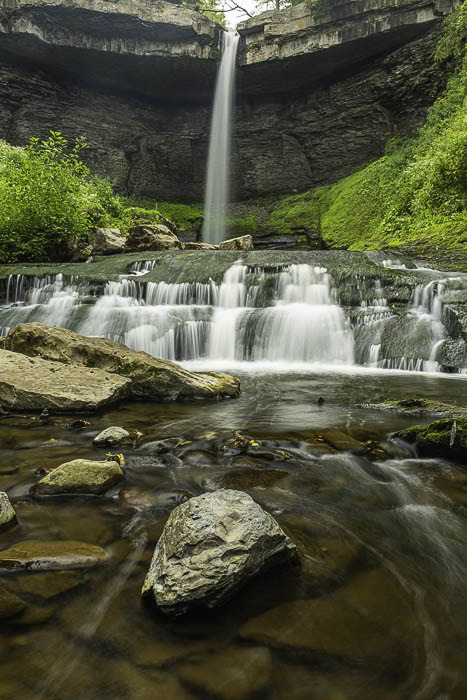
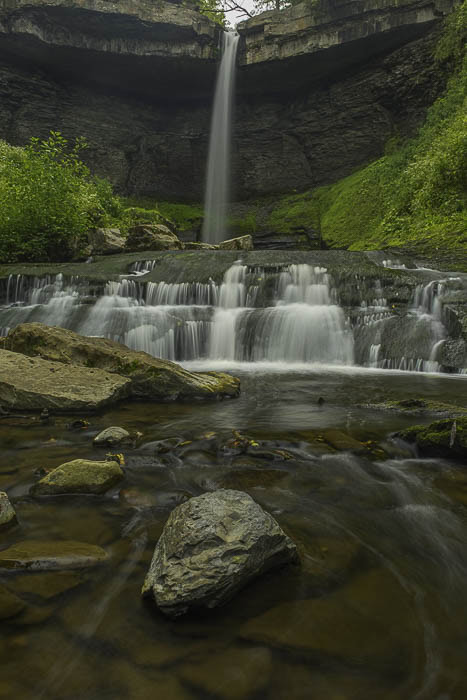
So you are probably saying to yourself why would I use a linear profile it looks like crap compared to the Color profile.
I won’t disagree with you that right now, the color profile looks a ton better than the Linear.
However, let’s look closer and think about future edits.
First, the water brightness and texture. With the Color profile, you will be fighting the baked-in brightness, and if the image was nearly overexposed to star,t the profile would blow out the whites.
Next, consider the water texture. I like to burn the dark areas in the white water to add more texture and contrast in the flowing water. With the linear profile, I have some “darker” areas where the luminosity mask can grab some space and add contrast.
The same goes for the greens in the foliage on the sides. I won’t be fighting the already bright greens, and I can add some highlights where I want them. It is much easier to add highlights and darken an area and have it look natural.
The linear profile allows you to make more of your editing style to the image and not Adobe’s style.
Grow Your Own Style
Growing your own style will become more important as you develop as a photographer. It is a good feeling when someone tells you they knew it was your image just by looking at it.
Sure, it can be quicker and easier to have Adobe half-edit your image, but quicker isn’t always better, and you will get more satisfaction making more of the edits yourself.
Most of the downsides to Linear Profiles are discussed below. You will see they are about time and learning how to add new editing skills to your resume.
Remember, do you want to make quick edits or better edits?
Are There Any Downsides?
No tool is perfect, and linear profiles aren’t for everyone or every scenario.
1. Flat Appearance Out of the Gate
The most obvious downside is that images initially look flat or even dull compared to the punchy look of Adobe Color or Adobe Landscape.
This can be off-putting for beginners who rely on the “baked-in pop” to visualize their final image.
2. More Time-Intensive Editing
Because you’re starting with a truly neutral image, you’ll likely spend more time fine-tuning contrast, color, and tonal balance manually. For quick edits or casual projects, a linear profile may feel like overkill.
3. Steeper Learning Curve
Linear profiles really shine when used by photographers who understand how to manipulate RAW data skillfully—particularly those who use advanced techniques like luminosity masking. If you’re unfamiliar with these methods, there may be a learning curve before you see the benefits.
What Kinds of Photos Benefit Most?
While any RAW image can technically be edited with a linear profile, certain genres tend to benefit more than others:
- Landscape Photography – Especially sunrise or sunset scenes with extreme dynamic range
- Nature and Macro Photography – Mushrooms, insects, and flora where subtle texture and tonal detail are important
- High-Contrast Scenes – Forest interiors, snow-covered landscapes, or strong backlighting conditions
- Fine Art Photography – Where creative control over tone and color is paramount
Where to Get Tony Kuyper Linear Profiles
Tony Kuyper offers his Linear Profiles as part of his Luminosity Masking Panel toolkit, which includes both the profiles and a set of sophisticated tools for Adobe Photoshop and ACR. These profiles are often updated and optimized for different camera brands and models.
You can learn more and download them directly on his website: https://tonykuyper.comhttps://goodlight.us/linear-profiles.html
They are Free!
How to Install a Linear Profile in Adobe Lightroom or ACR
Below is a video that shows you how to download and install your camera’s linear profile to your Lightroom and ACR. It also does a good job explaining more about Linear Profiles and how to use it with your images.
Other Providers of Linear Profiles
While Tony Kuyper’s profiles are among the most popular in the professional photography community, other resources also offer linear or flat profiles for RAW editing:
- ColorFidelity – Offers flat and linear profiles custom-matched to specific camera models.
- VisionColor OSIRIS/ImpulZ – While mainly known for LUTs, they provide neutral profiles designed for color grading.
- Adobe DNG Profile Editor – For users who want to build their own linear profiles, Adobe provides the tools to create and customize them from scratch.
Final Thoughts
Tony Kuypers Linear Profiles give photographers a powerful and flexible foundation for editing RAW images. By removing the baked-in tone curve found in standard profiles, you’re free to create your own contrast, tone, and color from the ground up—especially when paired with advanced techniques like luminosity masking.
While they might not be the best fit for every photographer or workflow, they’re an incredible resource for those seeking maximum creative control, particularly in landscape and nature photography.
If you’re serious about elevating your RAW editing, these profiles are worth exploring—and once you learn to use them effectively, you might never go back to standard profiles again.
Do I Use Linear Profiles?
Yes and No. It depends on the image and how well the Adobe Adaptive Profile works on the image. However, I think I was enamored with the Adaptive profile “magic.” In the future, I will most likely go back to Linear Profiles.